What Is Hyper-Converged Infrastructure?
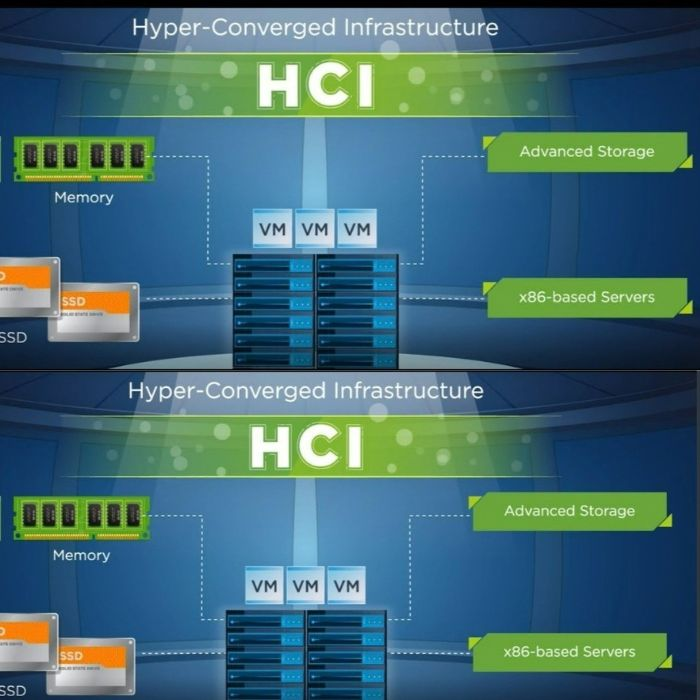
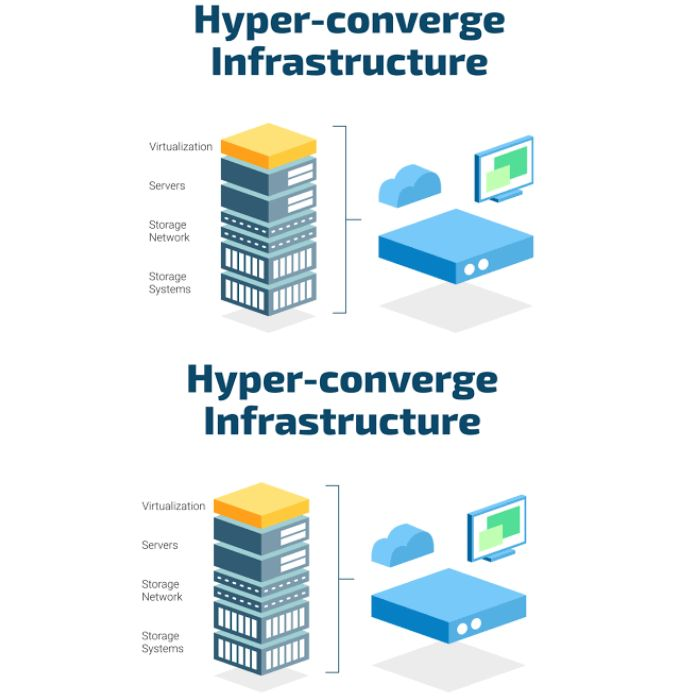
Hyper-Converged Infrastructure (HCI) is an IT infrastructure architecture that combines several traditionally separate data center components into a unified system.
These commonly include:
- Compute
- Storage
- Networking
- Virtualization
- Infrastructure management
Rather than managing each component as an independent infrastructure platform, HCI provides a more integrated architecture through software-defined technologies and centralized management.
A typical HCI environment consists of multiple nodes working together. Each node contributes computing and storage resources to the overall infrastructure environment.
As requirements increase, organizations can expand the environment by adding additional nodes.
How Does HCI Work?
Traditional infrastructure often follows a model where servers, storage arrays and networking systems are purchased and managed separately.
For example, an organization may have:
Physical Servers → SAN/NAS Storage → Network Infrastructure → Hypervisor → Management Tools
HCI brings many of these infrastructure functions together within an integrated architecture.
A simplified HCI model can be represented as:
HCI Nodes → Compute + Storage + Virtualization + Network Integration → Centralized Management
The exact architecture depends on the HCI platform, workload requirements and infrastructure design.
Key Components of HCI
1. Compute
Compute resources provide the processing capacity required to run virtual machines, applications and workloads.
2. Storage
HCI uses software-defined storage to combine storage resources across infrastructure nodes into a managed storage environment.
3. Virtualization
Virtualization allows multiple virtual machines and workloads to operate within the infrastructure environment.
4. Networking
Networking connects HCI nodes, workloads, users and external systems while supporting the required performance and availability.
5. Centralized Management
HCI platforms typically provide management capabilities through a centralized interface, allowing administrators to monitor and manage infrastructure resources.
What Are the Benefits of HCI?
Simplified IT Management
One of the main objectives of HCI is to simplify infrastructure administration.
Instead of managing multiple independent infrastructure platforms, IT teams can manage major infrastructure resources through an integrated environment.
Scalability
Traditional infrastructure expansion can require separate planning for servers, storage and networking.
HCI uses a modular approach where additional nodes can be introduced as capacity requirements grow, depending on the selected platform and architecture.
Centralized Administration
Centralized management can provide greater visibility into infrastructure resources, workloads and performance.
Reduced Infrastructure Complexity
Combining infrastructure functions can reduce the number of independent systems that IT teams need to configure and maintain.
Faster Infrastructure Deployment
Integrated infrastructure can simplify deployment compared with designing and integrating multiple standalone infrastructure components.
Support for Virtualized Workloads
HCI is particularly relevant to organizations running virtual machines and application workloads within virtualized environments.
Flexible Infrastructure Expansion
Organizations can plan infrastructure expansion around business growth and workload requirements rather than making large infrastructure changes all at once.
HCI vs Traditional IT Infrastructure
Traditional infrastructure typically uses separate systems for compute, storage and networking.
For example, an organization may purchase:
- Dedicated servers
- SAN or NAS storage
- Network switches
- Separate virtualization software
- Multiple management platforms
- Independent backup infrastructure
This model can provide flexibility, but it can also increase infrastructure design and management requirements.
HCI takes a more integrated approach by combining compute, storage and virtualization capabilities within a unified infrastructure architecture.
The appropriate model depends on factors such as workload requirements, existing infrastructure, budget, scalability requirements, application compatibility and operational preferences.
HCI vs Converged Infrastructure
The terms converged infrastructure and hyper-converged infrastructure are sometimes used interchangeably, but they represent different architectural approaches.
Converged infrastructure typically combines infrastructure components into a pre-engineered solution while the components may remain architecturally distinct.
HCI goes further by using software-defined technologies to integrate compute, storage and virtualization into a more unified infrastructure platform.
This distinction is important when evaluating infrastructure modernization projects.
HCI and Virtualization
Virtualization is one of the key technologies commonly associated with HCI.
Instead of running one application directly on each physical server, virtualization allows multiple virtual machines to share physical computing resources.
HCI provides the infrastructure layer required to operate and manage these workloads while combining computing and storage resources within the same architecture.
This makes HCI particularly relevant for organizations operating virtualized data centers.
HCI for Private Cloud
HCI can also serve as an infrastructure foundation for private cloud environments.
Organizations implementing private cloud infrastructure may require:
- Virtualized compute
- Scalable storage
- Network integration
- Centralized management
- Automation
- Security controls
- Backup and disaster recovery
HCI can provide the underlying infrastructure platform, while cloud management and orchestration technologies can provide additional cloud-style services.
HCI for UAE Businesses
Businesses in Dubai and across the UAE operate in environments where scalability, availability and efficient IT management are important considerations.
HCI may be relevant for:
Enterprises
Large organizations can use HCI to modernize virtualized infrastructure and simplify data center operations.
SMBs
Small and medium-sized businesses can consider HCI when they require scalable infrastructure without building highly complex standalone data center environments.
Multi-Branch Organizations
Organizations with multiple offices can use standardized infrastructure architectures to improve consistency across locations.
Data Centers
HCI can support infrastructure modernization projects involving virtualization, private cloud and business-critical applications.
VDI Environments
Organizations deploying Virtual Desktop Infrastructure can use HCI to provide the compute and storage resources required for virtual desktops.
When Should a Business Consider HCI?
HCI may be worth evaluating when an organization:
- Is replacing aging servers and storage
- Is expanding its virtualized environment
- Needs simpler infrastructure management
- Is implementing private cloud
- Requires scalable infrastructure
- Is planning a data center modernization project
- Wants centralized infrastructure management
- Is deploying VDI
- Has growing storage and compute requirements
- Needs a standardized infrastructure architecture
However, HCI is not automatically the right architecture for every workload.
Organizations should evaluate application compatibility, performance requirements, storage requirements, scalability, networking, backup, disaster recovery and total cost of ownership before selecting an infrastructure platform.
Important Factors to Consider Before Implementing HCI
Workload Requirements
Analyze CPU, memory, storage capacity and I/O requirements for existing and future workloads.
Scalability
Determine how the infrastructure is expected to grow over the next several years.
Availability
Define the required levels of redundancy and availability for business-critical applications.
Backup & Disaster Recovery
HCI should be incorporated into the organization's wider backup and disaster recovery strategy.
Network Architecture
Network performance and design can have a significant impact on HCI workloads.
Security
Organizations should consider network segmentation, access control, endpoint security, monitoring and other security requirements as part of the architecture.
Total Cost of Ownership
The evaluation should consider hardware, software, licensing, implementation, support, maintenance and future expansion costs.
HCI Implementation Process
A successful HCI project typically begins with infrastructure assessment rather than hardware selection.
A structured implementation process may include:
Step 1 – Infrastructure Assessment
Review the existing servers, storage, applications, virtual machines and network infrastructure.
Step 2 – Workload Analysis
Identify performance, capacity and availability requirements.
Step 3 – HCI Architecture Design
Develop an architecture based on current and projected business requirements.
Step 4 – Deployment
Install and configure the HCI infrastructure, virtualization and networking components.
Step 5 – Migration
Migrate workloads according to an approved migration plan.
Step 6 – Testing
Validate performance, connectivity, availability and application functionality.
Step 7 – Monitoring & Support
Monitor the infrastructure and provide ongoing maintenance and technical support.
Why Work with an HCI Solution Provider?
HCI projects involve more than installing servers.
Infrastructure architecture, virtualization, storage, networking, security, backup, disaster recovery and workload migration need to work together.
An experienced IT infrastructure partner can help organizations evaluate their current environment, design an appropriate architecture, implement the solution and provide ongoing support.
ITSP Technologies provides infrastructure consulting, HCI deployment, virtualization, networking, backup, disaster recovery and managed IT services for organizations in Dubai and across the UAE.
Conclusion
Hyper-Converged Infrastructure provides an integrated approach to modern IT infrastructure by combining compute, storage, virtualization and management capabilities into a unified architecture.
For organizations planning infrastructure modernization, HCI can provide a scalable and centrally managed foundation for virtualized workloads, private cloud environments, VDI and business applications.
The right infrastructure architecture ultimately depends on the organization's workloads, scalability requirements, availability objectives, existing environment and long-term IT strategy.
Businesses evaluating Hyper-Converged Infrastructure in Dubai or elsewhere in the UAE can work with IT infrastructure specialists to assess their requirements and develop an appropriate HCI architecture.
Explore ITSP Technologies' Hyper-Converged Infrastructure Solutions to learn how HCI can be incorporated into your organization's infrastructure strategy.